
Streamlining Deferred Premium Calculations in Commodity Settlements
| Published: Apr 9, 2026 | Accounting , Grain , Product Updates , Release Notes | read
 read
readWhat to Know
- Eliminate manual work and errors by automatically calculating deferred premiums when settlements are marked as deferred, improving accuracy and efficiency.
- Gain consistent, predictable results through standardized fee logic based on net settlement values, while still allowing user overrides when needed.
- Speed up settlement workflows with smarter configuration options and intuitive system updates that reduce friction for accounting teams.
Traditionally, users have been required to manually calculate and enter deferred premium amounts each time a settlement is marked as deferred. Not only is this time‑consuming, but it also opens the door to data entry errors that can slow down processes and create financial inaccuracies.
To address these challenges, a new enhancement from Levridge introduces automatic deferred fee calculation, bringing greater speed, precision, and consistency to settlement workflows.
Why Automating Deferred Fees Matters
When companies offer a deferred settlement option, the premium charged is often standardized across customers. Even so, users previously had to perform the calculation manually or rely on an optional calculator within the settlement wizard. This created unnecessary steps and opportunities for mistakes—especially when working with large quantities, multiple tickets, or complex settlement adjustments.
By automating the calculation, organizations gain:
- Reduced manual effort
- Fewer entry errors
- Consistent application of fee logic
- Faster settlement processing
What’s Changing in the System
The enhancement introduces new configuration options and updated labels to make the deferred fee process more intuitive.
Updated Commodity Accounting Parameters
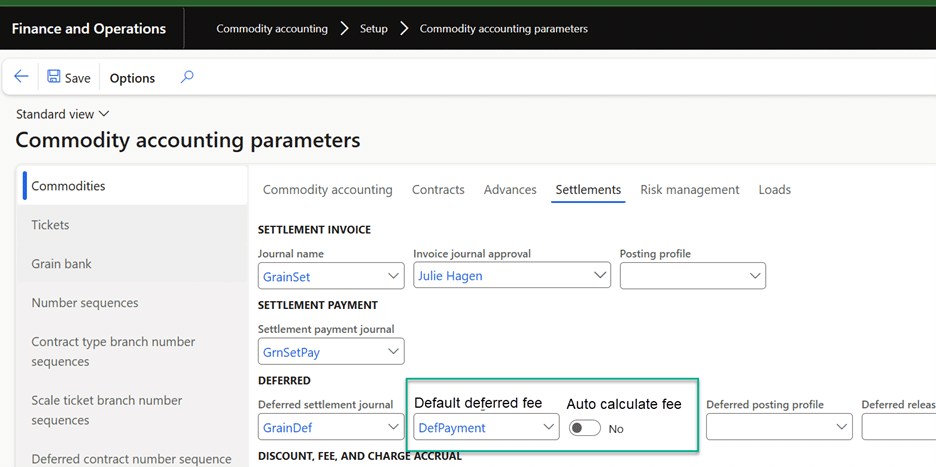
Administrators can now set:
- Default deferred fee (previously “Deferred charge code”)
- Auto calculate fee (Yes/No), which determines whether the system should automatically compute the deferred premium whenever a settlement is deferred
The auto‑calculate setting works independently—meaning users may use it even without selecting a default fee.
Smarter Settlement Requests
When a user creates a settlement request and marks it as deferred:
- The system automatically calculates the deferred premium if auto‑calculate is enabled.
- Users can still override the calculated amount when necessary.
- The calculation only occurs when the deferred fee selection changes, ensuring control and predictability.
Based on the selected fee’s configuration, the system handles calculations as follows:
- Rate per unit: Multiplies the net quantity by the fee value
- Percent of price: Multiplies the net settlement amount by the fee value
- Accrual or amount per load: No automatic calculation; users enter the amount manually
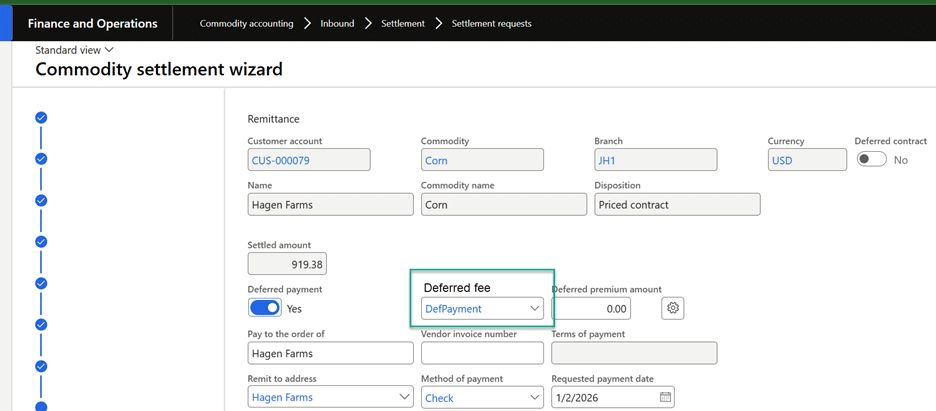
The system consistently uses settlement net values, regardless of whether the underlying fee is configured as gross or net, ensuring uniformity in results.
A refreshed “Calculate deferred premium” dialog also provides rate defaults based on the fee type, reducing manual setup.
Improved Settlement Payments
These same capabilities extend to the Settlement Payment form:
- Automatic calculation is applied when a deferred fee is selected.
- Calculations use updated net amounts if users adjust discounts or fees, although the system will not recalculate automatically once the premium is set.
This ensures users always maintain final decision‑making control.
A Small Enhancement With Big Efficiency Gains
Automating deferred fee calculations reduces friction for users while improving precision and consistency throughout the settlement process. By integrating this logic directly into the settlement process, the system empowers teams to work faster and with greater confidence—turning what used to be a manual, error‑prone step into a seamless part of everyday operations.