
Mass Apply Sales Contracts to Multiple Order Lines with Levridge Commodity Accounting
| Published: Aug 28, 2026 | Accounting , Grain , Product Updates , Release Notes | read
 read
readThe new Sales Order Application feature allows users to select multiple order lines for the same customer and apply them to a sales contract delivery period together.
This creates a more efficient workflow for organizations managing recurring deliveries, monthly orders, multiple product variations, or high volumes of open sales order lines.
Why Mass Contract Application is Important
Many agribusinesses create customer orders days, weeks, or even months before fulfillment. When products are shipped and invoiced, accounting teams must determine which sales contract should be applied to each order. In many organizations, the team entering the sales order is not responsible for contract assignment, creating an additional step in the invoicing process.
As order volumes increase, manually selecting a sales contract for every individual order line can become time-consuming, especially when the same contract applies across multiple sales orders.
Where to Find the Sales Order Application Feature
The Sales Order Application feature is available in two areas of Levridge Commodity Accounting, making it easy for accounting teams to access contract application workflows from either commodity operations or accounts receivable. Navigation Paths:
Commodity Accounting Module
- Commodity Accounting → Outbound → Deliveries → Sales Order Application
Accounts Receivable Module
- AR → Orders → Sales Order Application
How It Works
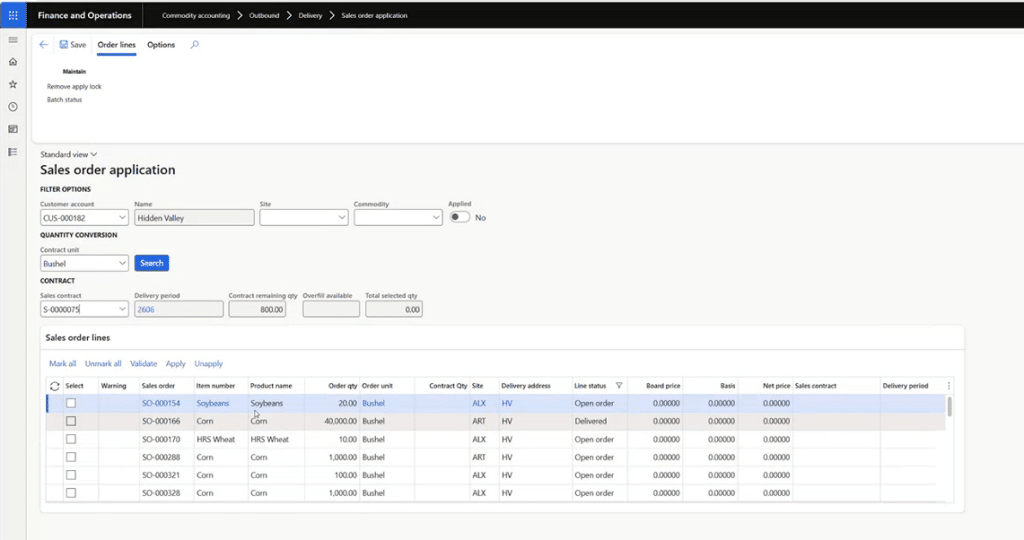
Once opened, users select a customer account, review eligible commodity sales order lines, choose a sales contract delivery period, validate the application, and submit the process for batch execution. The feature is designed to allow users to continue working while contract applications are processed in the background.
After reviewing the eligible lines, the user can:
- Mark one or more order lines.
- Select an open, priced sales contract delivery period.
- Review the remaining contract quantity, available overfill, and total selected quantity.
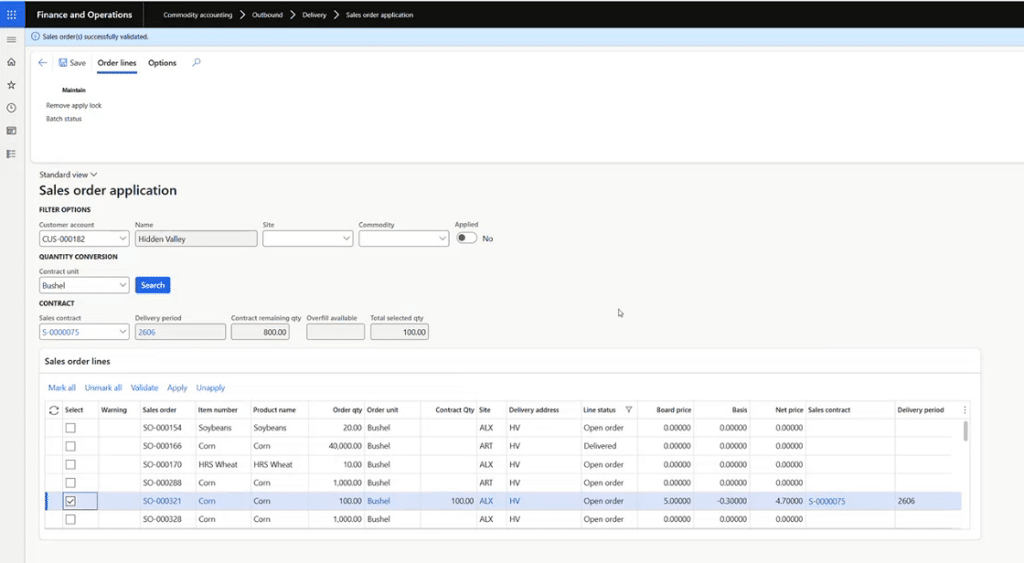
- Validate the selected lines against the contract.
- Review applicable board, basis, and net pricing.
- Apply the contract through a batch process.
The validation process checks factors such as available quantity, delivery address requirements, and whether the commodity and unit exist on the contract or its alternate delivery period lines.
Before processing, Levridge checks the available quantity again. If one line cannot be applied, the system continues processing the other eligible lines rather than reversing completed applications.
Feature Benefits at a Glance
- Apply a sales contract to multiple order lines at once.
- View applied and unapplied commodity order lines.
- Convert order quantities into the selected contract unit.
- Compare selected quantities with the contract’s remaining quantity.
- Validate contract eligibility and pricing before applying.
- Account for permitted contract overfills.
- Apply or unapply selected lines through batch processing.
- Continue working while applications process.
- Review batch status and application details.
- Access dedicated inquiries for unpriced and commodity sales order lines.
By bringing selection, validation, pricing visibility, and batch processing into one workflow, Levridge gives accounting teams a more direct way to manage sales contract application across complex customer orders.
Additional Resources
- YouTube Video:
- Commodity Accounting