
Accrue Outstanding Discounts and Fees Before Month-End Close
| Published: Aug 25, 2026 | Accounting , Grain , News , Tips | read
 read
readAgribusinesses may reach the end of an accounting period with discounts or fees still outstanding on inbound tickets. Checkoff amounts may be due, storage fees may continue to accumulate, or other ticket-related charges may not yet be reflected in the general ledger.
Levridge allows accounting teams to calculate and post these amounts through the Discounts, fees and charges accrual feature.
This process gives teams a way to recognize qualifying expenses in the appropriate accounting period, even when the related inbound tickets have not yet completed the settlement process.
Create Accruals for Outstanding Inbound Ticket Charges
Navigate to the Discounts, fees and charges accrual form: Commodity accounting > Inbound > Settlement > Discounts > Fees and charges accrual.
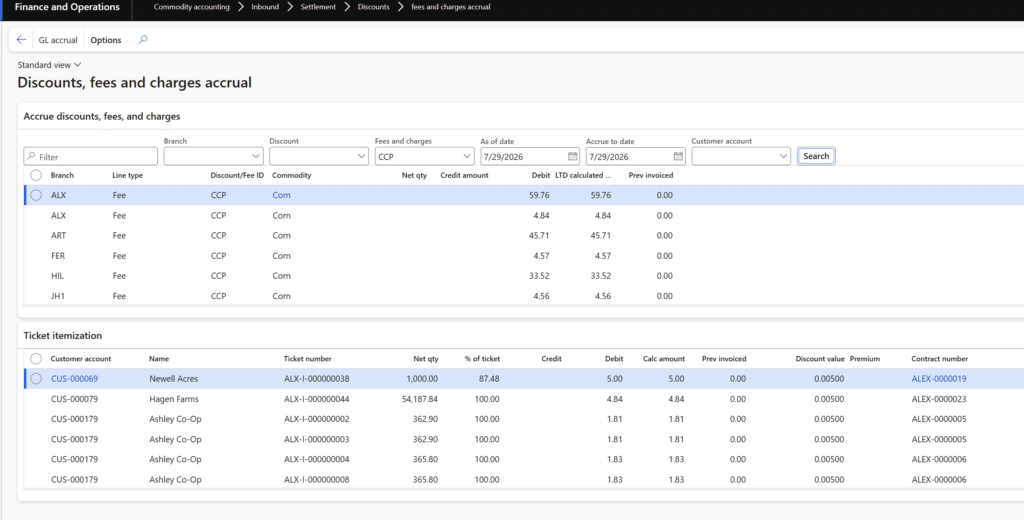
Users begin by selecting either a discount or a fee. They can then narrow the records by branch or customer, making it easier to focus the accrual calculation on the appropriate part of the business. On the form you have to select either a discount or fee. Then you can limit it by the branch or customer.
Control the Accrual Period with Date Selections
The form includes two date fields that serve different purposes:
- The ‘As of date’: The date that you wish to accrue to. So if you are running the process on August 3, you can set the date to July 31 to get the data as of that date.
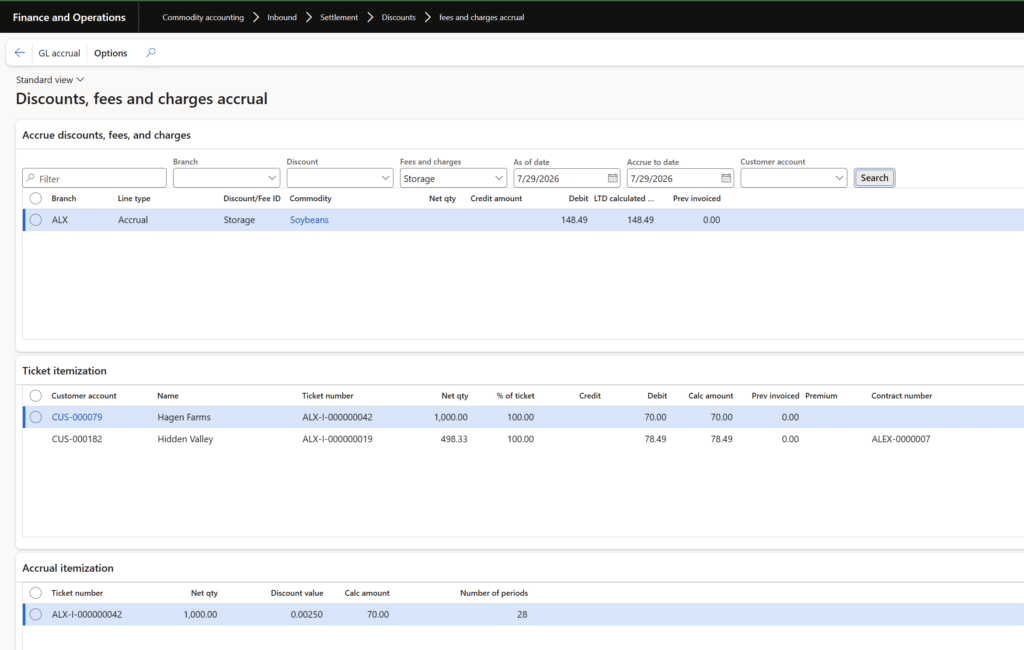
- The ‘Accrue to date’: The date you want to accrue the charges to. This would be used in the case of storage where the value keeps accumulating, but it wouldn’t be applicable to discounts or fees that are not accrual based.
These date controls allow the accounting team to run the process after month-end while still calculating the accrual based on the intended reporting date.The real value of new software solutions comes from changing how work gets done. Successfully implementing a new ERP system is a significant accomplishment. Employees have been trained, data has been migrated, and the software is finally live. The organization is ready to move forward.
Review Ticket Details Before Creating the Journal
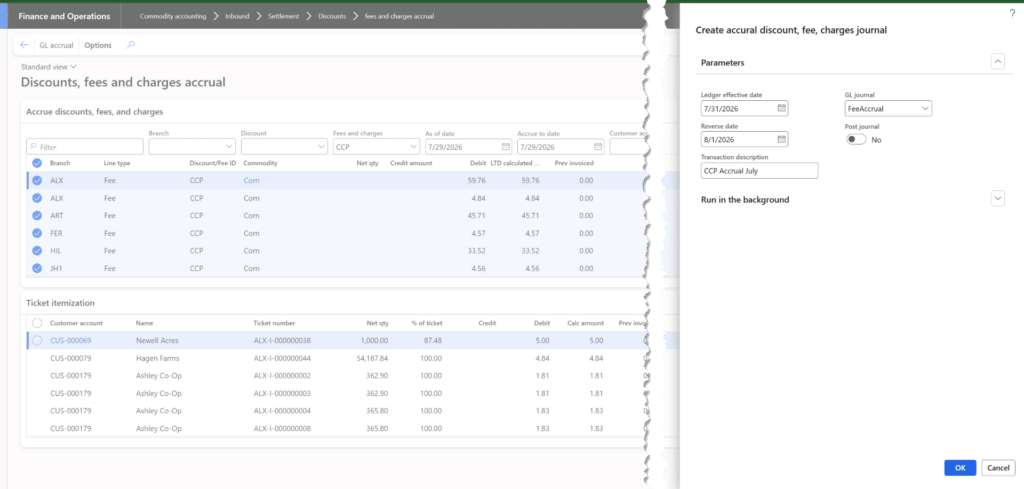
The accrual form displays qualifying records in the top grid and provides underlying ticket information for review. After reviewing the results, users select the records they want to accrue and choose the GL accrual menu item. Levridge then opens the Create accrual discount, fee, charges journal dialog.
This step gives users an opportunity to confirm which records will be included before creating the accounting entry.
Define the Posting and Reversal Dates
Within the journal dialog, the user enters the Ledger effective date, which determines the posting date for the accrual. The user also enters a Reverse date to specify when the accrual should be reversed. An optional transaction description can provide additional context for the resulting entries.
The user must also select the general ledger journal for the posting. The selected journal must:
- Use the Daily journal type
- Have an offset account defined
Users can post the journal immediately or leave it unposted for review and manual posting in the general ledger.
Understand How Levridge Builds the GL Entry
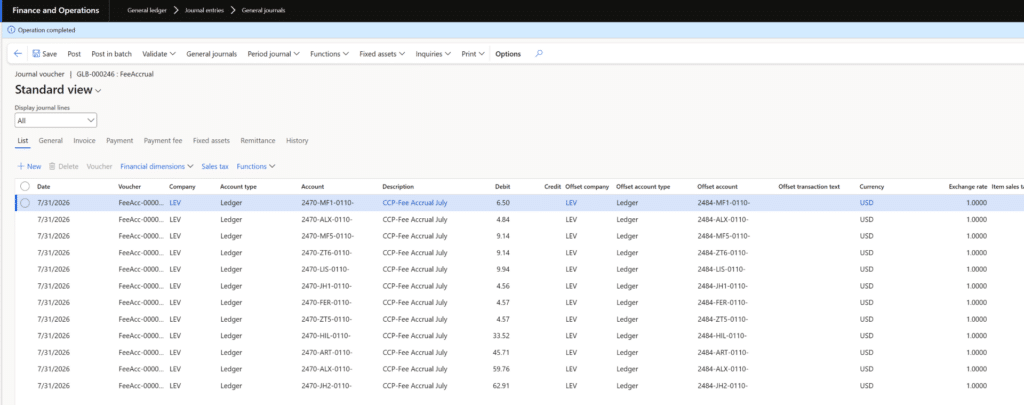
The records selected for accrual determine how Levridge creates the journal entry. The system summarizes the selected data by branch and commodity. It posts the debit to the account specified in the discount or fee configuration and uses the offset account defined on the selected general ledger journal.
When financial dimensions are defined for the site or item, Levridge includes those dimensions in the journal entry.
Support a More Complete Month-End Process
Outstanding ticket charges can create additional work when accounting teams need to recognize expenses in the correct reporting period. The Discounts, fees and charges accrual feature provides a defined process for identifying eligible records, calculating accrual amounts, reviewing ticket-level details, and creating the corresponding general ledger journal.
By bringing the calculation and journal creation into Levridge, accounting teams can manage checkoff, storage, and other outstanding inbound ticket charges within the same commodity accounting workflow they use for daily operations.