
Apply Contract-Specific Discounts Without Creating New Schedules
| Published: Oct 8, 2026 | Accounting , Grain , Product Updates , Release Notes | read
 read
Levridge Commodity Accounting gives users the ability to select an additional discount that is not already included in the contract’s discount schedule. They can apply the discount to either a sales contract or a purchase contract, including contracts that do not have a discount schedule assigned.
Users gain more flexibility by allowing them to add specific discounts directly to sales and purchase contracts. This capability supports contract-specific requirements while preserving the organization’s existing discount structure.
Where to Find This Feature
Users can access this functionality directly from both sales and purchase contracts within Levridge Commodity Accounting. This feature appears on the contract header in a dedicated Additional discounts fast tab, located beneath the Apply partners section.
From this area, users can add contract-specific grade discount, choose whether calculations should be based on gross or net quantities, and manage additional discount records.
Sales Contracts
- Commodity accounting > Outbound > Contracts > Sales contracts
- Open a sales contract and locate the Additional discounts fast tab on the contract header.
Purchase Contracts
- Commodity accounting > Inbound > Contracts > Purchase contracts
- Open a purchase contract and locate the Additional Discounts fast tab on the contract header.
Once configured, Levridge automatically includes these additional discounts when inbound or outbound tickets are applied to the contract, ensuring contract-specific requirements are reflected in the final discount calculation.
How Additional Contract Discounts Work
Users access an Additional discounts section on the contract header. From there, they select a discount table associated with the contract commodity. Levridge Commodity Accounting automatically filters out discounts already included in the selected schedule, reducing the risk of duplicate entries.This enhancement in Levridge Commodity Accounting introduces automated freight bill accrual posting, allowing organizations to recognize freight costs when they become known.
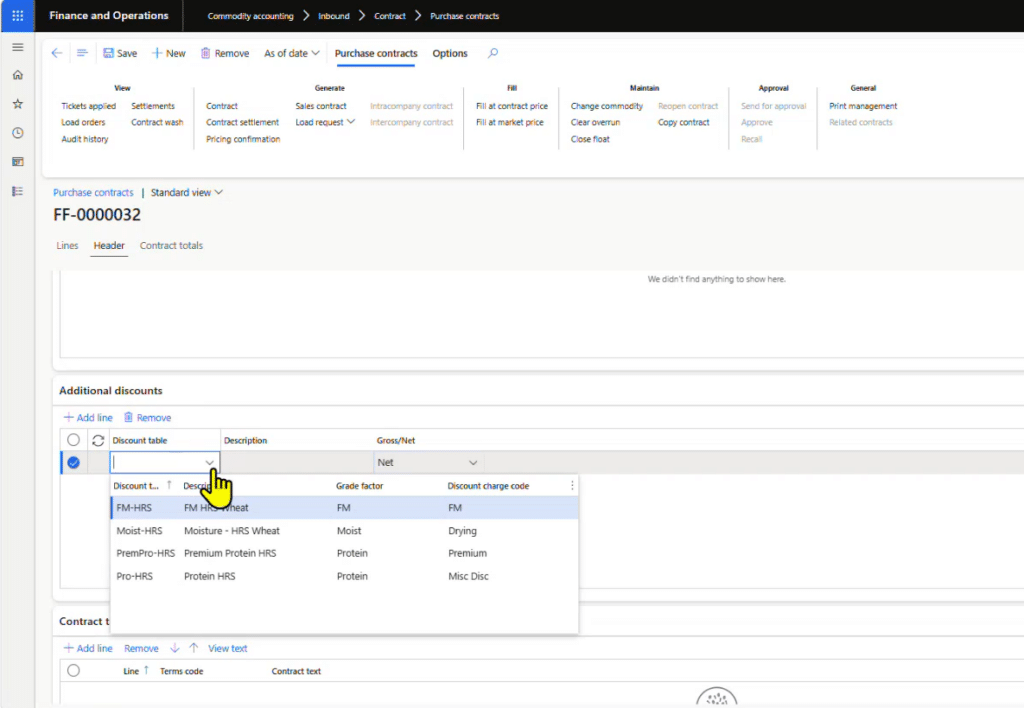
For each additional discount, users choose whether the calculation should use gross or net quantity. The feature defaults to net quantity. Levridge uses the rates defined in the selected discount table, so users do not need to enter or maintain separate rates on the contract.
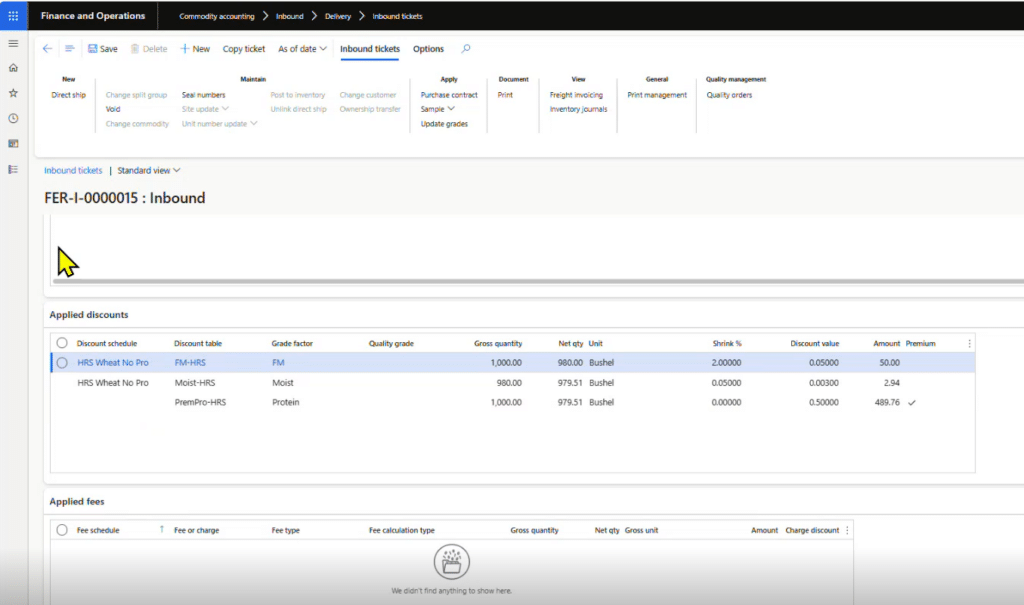
When a ticket is applied to the contract, Commodity Accounting calculates both the standard scheduled discounts and the additional contract discounts. The additional discount calculates a monetary value and does not calculate shrink. Depending on the discount table and premium setting, the calculation may decrease or increase the ticket value.
Why This Feature Is Important
Contract terms do not always fit neatly into standardized schedules. Giving users a controlled way to address exceptions reduces the need to create highly specialized discount schedules for occasional or variable requirements.
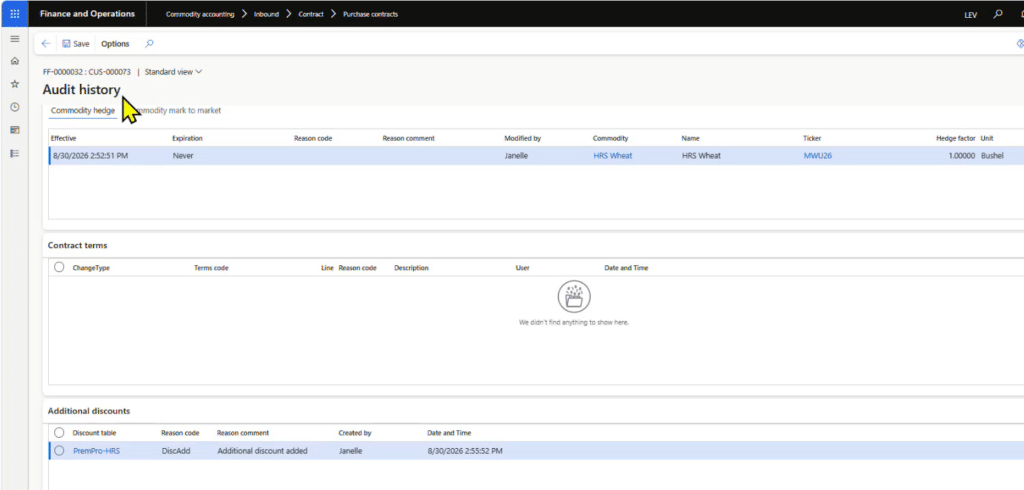
The feature also maintains important safeguards. Commodity Accounting prevents a discount from calculating twice, restricts changes after tickets or sales orders have been applied, and records additions and removals in the audit history.

Feature Benefits at a Glance
- Add contract-specific discounts without creating another discount schedule.
- Support both sales and purchase contracts.
- Calculate discounts automatically when tickets are applied.
- Calculate against gross or net quantity.
- Use established rates from the selected discount table.
- Prevent duplicate discount calculations.
- Preserve a record of additions and removals in audit history.
- Control changes based on contract status, applied transactions, and user permissions.
This enhancement gives agribusinesses greater flexibility to manage nonstandard contract terms while maintaining consistent calculations, operational controls, and audit visibility.
Additional Resources
- YouTube Video: https://www.youtube.com/watch?v=BzuXDsbT7Tg
- Commodity Accounting