
Freight Invoice and Accrual Posting Dates
| Published: Apr 27, 2026 | Accounting , Grain , Product Updates , Release Notes | read
 read
readLevridge Commodity Accounting gives you the control over posting dates for both freight invoices and accruals. This means you can:
- Add clear descriptions for easier auditing.
- Post invoices as of a previous date for accurate due dates and GL postings.
- Ensure accruals reflect the correct accounting period.
What to Know
- You can now control posting dates for freight invoices and accruals—ensuring accurate GL periods, due dates, and cleaner month-end close even when invoices arrive late.
- Clear transaction descriptions and calculated reversal dates improve auditability and reduce manual cleanup during financial reviews.
Why Posting Date Flexibility Matters
Month-end processes rarely wrap up on the last day of the month. Freight invoices often arrive late, and accruals may need to be posted after the calendar flips. Without the ability to backdate transactions, your financial statements can become inaccurate, and audits turn into headaches.
What’s New
Previously, Levridge relied on the user session date for posting. While this worked for most cases, it lacked flexibility. The new functionality introduces:
- A Posting Date field for freight invoicing and accruals.
- A Transaction Description field for better clarity in GL vouchers.
- A calculated Reversal Date for accrual reversals.
These enhancements make freight accounting more precise and user-friendly.
Step-by-Step: Freight Invoicing
- Navigate to Freight Invoicing: Commodity Accounting > Freight > Freight Invoicing.
- Select unmatched freight bills and click Vendor Invoice or Invoice and Pay.
Enter Posting Date
- On the Generate Freight Bill Invoice dialog, you’ll see a new Posting Date field.
- This defaults to your user session date, but you can change it to any valid date.
- The posting date updates the vendor invoice journal and GL voucher automatically.
- The existing Invoice Date field is now labeled Vendor Invoice Date for clarity.
Step-by-Step: Freight Accruals
- Open Freight Accrual Dialog: From unmatched freight bills, click Freight Accrual in the action pane.
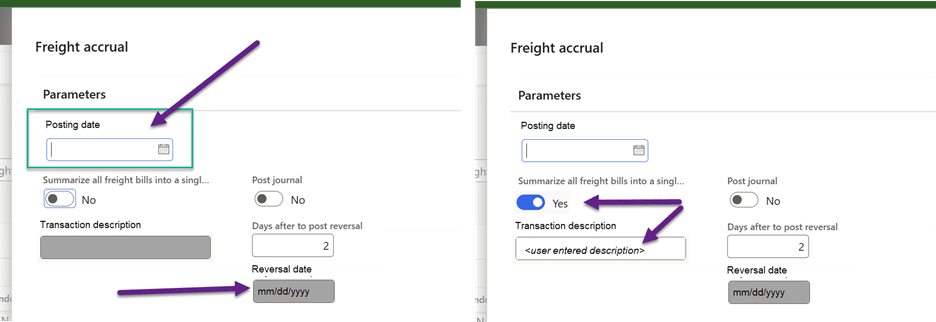
- Set Posting Date: Enter the desired posting date. Again, it defaults to the session date but can be changed.
Add Transaction Description
- If you choose Summarize all freight bills into a single line, the description field becomes editable.
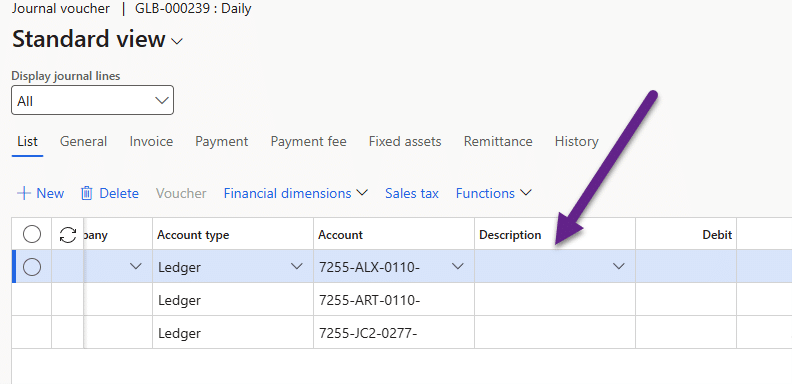
- Enter a meaningful description for the GL voucher. If not summarizing, the system auto-generates a description with the site, ticket number and ‘freight accrual’. For example, ‘BAR 12345678 freight accrual’.
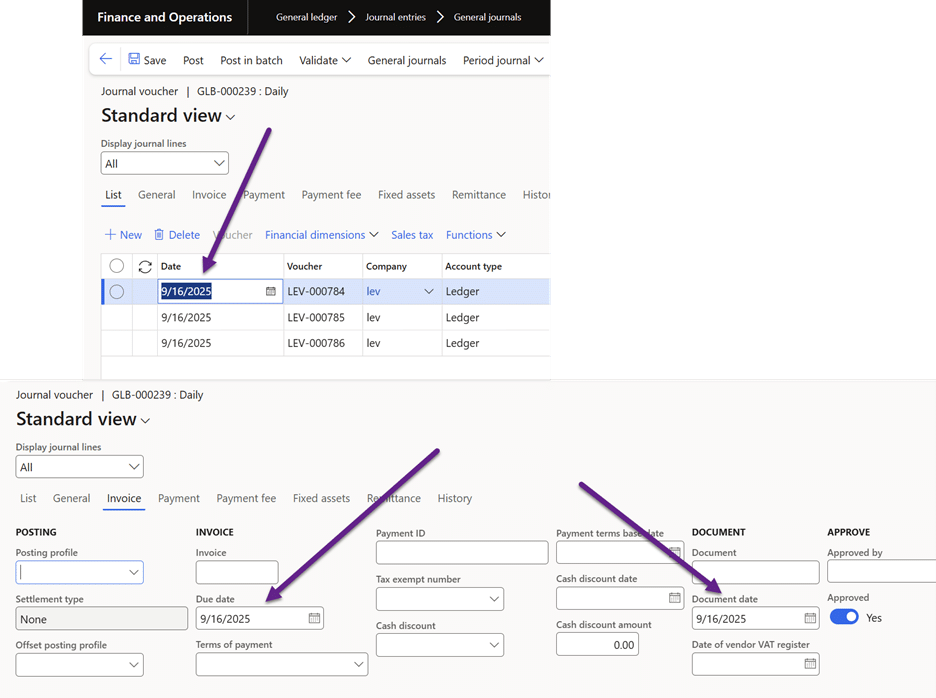
- The date selected in the posting date will update the GL journal date field.
Review Reversal Date
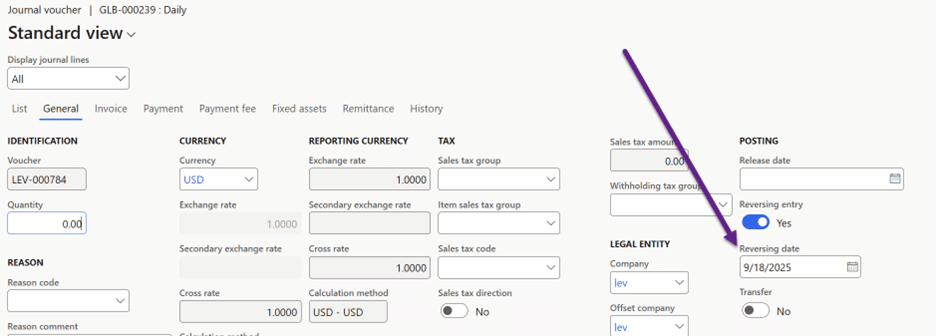
- The system calculates the reversal date by adding the configured number of days to your posting date.
- This is display-only but updates dynamically as you change inputs.
These enhancements save time, reduce errors, and improve transparency. By giving you control over posting dates and descriptions, Levridge helps you close the books confidently—even when real-world timing doesn’t align perfectly with the calendar.
Key Takeaways
- Use the Posting Date field to backdate invoices and accruals.
- Add clear descriptions for better audit trails.
- Verify reversal dates for accurate accrual reversals.