
Importing Board and Basis from Scale Through AgXML
| Published: Feb 23, 2026 | Accounting , Grain , Product Updates , Release Notes | read
 read
readManaging commodity pricing accurately is critical for smooth operations in the agricultural industry. With the latest enhancements in Levridge, users can now import board price and basis directly from scale tickets using the AgXML format. This blog will walk you through the purpose of this feature, how it works, and what you need to know to use it effectively.
Why This Feature Matters
Growers might choose to lock in the board and basis at the time of delivery. In the past, Levridge tickets did not easily capture this information, which made contract pricing more complex. The new functionality ensures these values flow seamlessly into Levridge from your scale system, improving accuracy and reducing manual entry.
What’s New?
Levridge already supports AgXML scale ticket imports and passes the board or basis into the system when the scale operator enters it at delivery.
This enhancement complements existing features like spot pricing, introduced in the 2024 1.5 release, which lets users identify whether a ticket should use spot end-of-day or spot immediate pricing.
Key Details to Remember
- Fields Added: Two new fields—Scale Board and Scale Basis—can be added to the Scale Ticket Split Details grid via personalization.
- Availability: These fields apply only to inbound tickets, not outbound or transfer tickets.
How It Works in Practice
Inbound Tickets
Navigate to Commodity Accounting > Inbound > Delivery > Inbound Tickets on the detail form. In the Scale ticket split details fast tab, you can personalize the grid to include Scale Board and Scale Basis. The system allows users to enter these values at any time, except when the ticket is voided or closed.
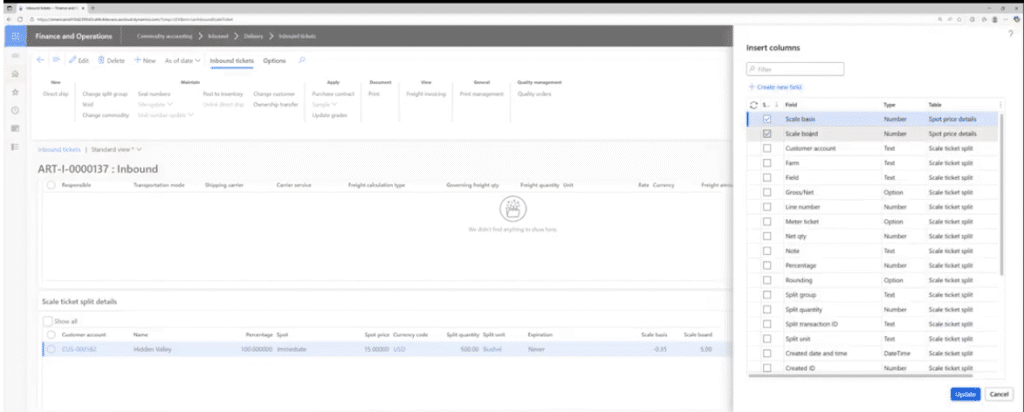
Inbound Ticket Application
On the Inbound Ticket Application form, the same fields can be added for reference. Note: these values cannot be modified on this form.
AgXML Mapping
When exporting tickets, the system maps:
- Scale Board → IRBoardPrice in ApplicationInstructions.
- Scale Basis → IRBasisPrice in ApplicationInstructions.
Additional Resources
View the accompanying YouTube video
For more information on Commodity Accounting, visit Commodity Accounting Solution.