
Levridge Long and Short Audit Report Improves Grain Contract Visibility and Control
| Published: Jul 8, 2026 | Accounting , Ag sales , Agronomy , Grain , Tips | read
 read
readThe Long and Short Audit Report in Levridge provides a daily view of changes to purchase contracts, sales contracts, and future trades. It will show you new contract delivery periods added, modified or cancelled.
One of the options when printing the audit report is to exclude basis activity. If this option is set to yes, the report will not show you any contracts that only have a basis. If you have a basis contract and set the price on the contract, the audit report will include it because now the board price has been set.
Scenario 1: New Contract Delivery Period
A purchase or sales contract created today with a board and basis, will be displayed on the report. If the delivery period line does not have a ticker selected, the delivery period start date will display in place of the ticker. When the delivery period line has only a board or basis (not fully priced) the record will also be displayed on the report.
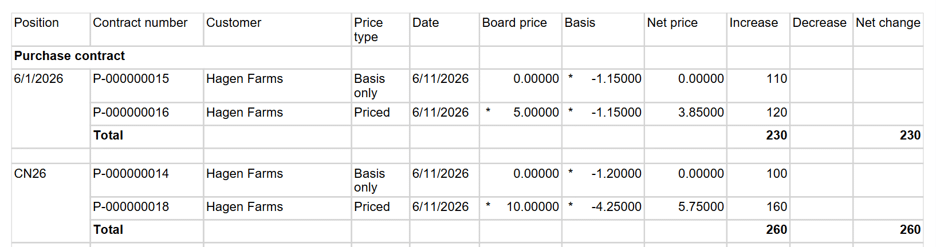
Scenario 2: Exclude Basis Activity
When running the audit report, if the report option ‘Exclude basis activity’ = Yes, the report will not include any records that only have basis value. It will still print any records that have board and basis or board only.

Scenario 3: Board Price Set and Exclude Basis Activity
If the contract delivery period is basis only or price later, then the board price is set. If the report option ‘Exclude basis activity’ = Yes, then that record will display on the report because the board value is now set. When the report was run earlier, contract P-000000017 had only basis defined and did not print on the report. The board price was set, report re-run and the delivery period now shows.

If a contract is modified more than once on the same day, it shows the ending result of that contract. It will not show you each modification throughout a day. But, if the contract was created the day before, then today there is a change to the price, ticker or quantity it will show in the report.
Scenario 4: Contract Changes on Different Day
The sales contract was entered yesterday with the ticker and fully priced. When you print the audit report for yesterday it would display. Then today the user changes the ticker on the delivery period line. When you print the audit report for today the value will be displayed with the change.
Audit report for yesterday:

Audit report for today after ticker change:

If a delivery period line was filled, using fill at contract price or fill at market price, the change will be displayed on the report the day it was canceled.
Scenario 5: Canceling or Filling Quantity on a Delivery Period Line
A contract was created yesterday, and if you print the audit report for that day it would display. Then today the user processes a fill at contract price on the delivery period line so it cancels the quantity. If you print the audit report for today, there will be a record that shows the reduction of the quantity.
Audit report for yesterday:

Audit report for today after the cancel was done:

The other information that is included on the long and short audit report are posted future trades. When a buy or sell futures trade is entered under Risk management, the trade information will be displayed on the report after it is posted.
Scenario 6: Posted Futures Trade
A user entered a buy for 2 contracts at 2.75 and a sell for 3 contracts at 3.25 for ticker CN26. When those trades are posted and the audit report is run, they will be displayed on the report.

In grain merchandising, contract and futures activity can change quickly throughout the day. New contracts are created, pricing is updated, delivery periods are modified, quantities are filled, and futures positions are posted. Keeping track of these changes is essential for maintaining accurate records and understanding risk exposure.
Additional Resources