
Streamlining Ag Sales Workflows: Option to Copy Attachments to Child and Rebilled Orders
| Published: Mar 26, 2026 | Ag sales , Grain , Product Updates , Release Notes | read
 read
readWhat to Know
- New D365 Ag Sales settings let you automatically copy attachments from parent orders to child and rebilled orders.
- Options for child orders and rebilled orders can be enabled in Ag Sales → Setup → Agriculture Parameters.
- This reduces manual uploads and keeps documentation complete across split and credit‑and‑rebill workflows.
A new enhancement now gives Ag industry users the option to automatically copy attachments from a parent sales order to all its related child and rebilled orders, ensuring documentation stays accurate, complete, and accessible every step of the way.
Why Attachments Matter
In many Ag operations, it’s common for several customers to share responsibility for a single sales order—what we know as splits. These orders often include crucial documents like contracts, delivery instructions, certifications, or images. When the system generates multiple child orders from a split, each stakeholder still needs access to the full set of supporting documents.
Similarly, when an order goes through a credit-and-rebill process, the newly created order often requires the same documentation as the original.
This update ensures that essential information follows with the transaction—automatically.
How It Works
In Ag Sales > Setup > Agriculture Parameters, users will now find a new group called Copy attachments.
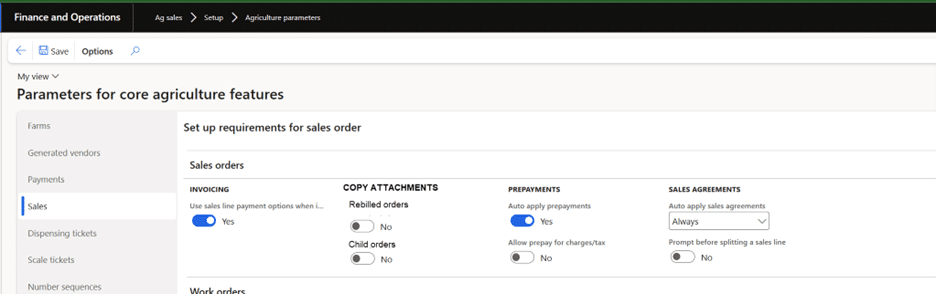
Within it are two options:
- Child orders
When enabled, any attachment on the parent sales order—whether at the header or line level—will copy to all child orders created during post packing slip or invoicing when splits are involved. - Rebilled orders
When enabled, attachments from the original order copy to the new positive sales order created in the credit-and-rebill process.
Both settings default to No, giving organizations the flexibility to opt in when it matches their workflow.
Where It Applies
- Sales Orders (Splits)
When posting a packing slip or invoice on a sales order with splits, the system will generate child orders. If the “Child orders” setting is turned on, those orders will automatically inherit all header and line attachments from the parent. - Credit and Rebill
When performing a credit and rebill—not just a credit—the new sales order created for re‑invoicing will also receive the original attachments, ensuring a clean and complete record. (Attachments will not copy to the credit order.)
Built for Real-Life Scenarios
This enhancement supports:
- Header-only or line-only attachments
- Single or multiple lines with attachments
- Orders with split groups or manually entered split customers
- Scenarios involving the “Sales line payment options invoicing” feature
- Complex split orders where terms, payment methods, or cash discounts differ by customer
A More Reliable, Connected Documentation Experience
With this update, users gain consistency, efficiency, and confidence. No more manual re‑uploading. No more hunting for missing documents across multiple related orders. And no more risk of incomplete data making its way to a customer.