
View Net Quantity on Inbound Tickets
| Published: Feb 4, 2026 | Accounting , Grain , Product Updates , Release Notes | read
 read
readWith the latest enhancement in Levridge Commodity Accounting 2025 R3, users can now view estimated net quantities when applying inbound tickets to purchase contracts. This feature simplifies decision-making and improves transparency during ticket allocation.
Why This Matters
Previously, users relied on gross quantities and manual calculations to estimate shrink and net quantities. This process was time-consuming and prone to errors. The new functionality provides real-time visibility into net quantities, ensuring that contracts reflect accurate values and reducing discrepancies during reconciliation.
How to Access
Navigate to: Commodity Accounting > Inbound > Delivery > Inbound Ticket Application
Ensure that:
- Enable inbound schedule = Yes under Commodity Accounting Parameters.
- Discount schedules are properly configured for tickets to calculate shrink.
Enhancements
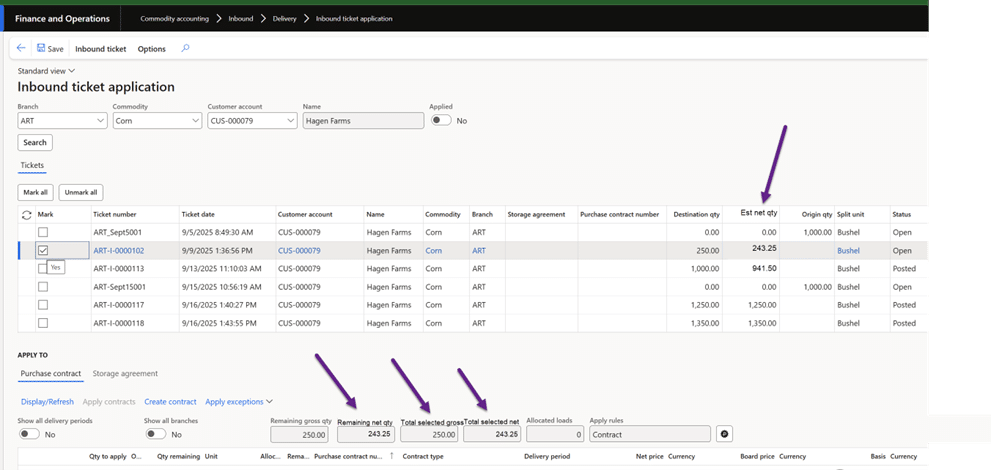
When the Enable inbound schedule parameter is set to Yes in Commodity Accounting settings, the Inbound Ticket Application form displays additional fields:
- Est Net Qty: Shows the estimated net quantity for each ticket. This is calculated as gross quantity minus shrink, based on the discount schedule selected in the ticket’s destination grades.
- Remaining Net Qty: Displays the remaining net quantity after tickets are applied to contracts. This helps users track what’s left to allocate.
- Total Selected Net: Provides a total of all selected tickets, giving a quick snapshot of the net quantity being applied.
- Relabeled Field: “Total selected qty” is now “Total selected gross” for clarity.
The system dynamically updates these fields as you mark or unmark tickets, ensuring totals remain accurate at all times.
Key Benefits and Impact
This enhancement streamlines ticket application by providing visibility into net quantities, reducing manual effort, and improving accuracy. By leveraging these new fields, users can make informed decisions and maintain precise contract allocations.
Additional Resources
Accompanying YouTube video
For more information on Commodity Accounting, visit Commodity Accounting Solution.