
Faster, Smarter Daily Position Reporting with DPR Summary
| Published: May 22, 2026 | Accounting , Grain , Product Updates , Release Notes | read
 read
readThe DPR Summary feature allows users to save a snapshot of DPR values as of a specific date. Future DPRs then use that snapshot as a starting point and only process activity that occurred afterward. It is designed to dramatically improve DPR performance without sacrificing accuracy or flexibility instead of recalculating history every time a report is run.
This approach preserves the ability to run a DPR for any date, while reducing the amount of data the system must process each time.
How the DPR Summary Works
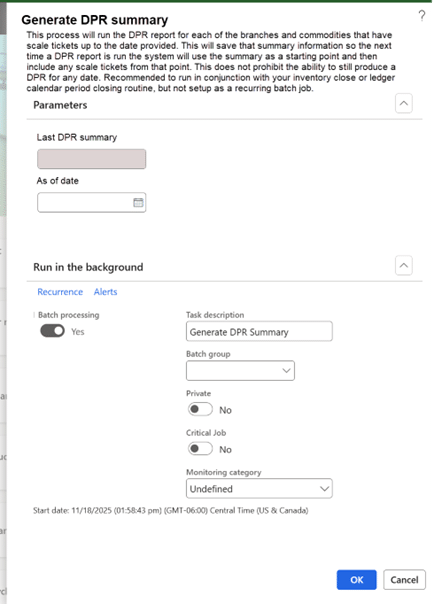
Users generate a DPR Summary through a periodic process, typically aligned with inventory close or ledger period close.
Commodity Accounting > Periodic Tasks > Generate DPR Summary
When the process runs:
- The system evaluates each branch and commodity combination that has scale ticket activity.
- DPR values are calculated as of the selected date and stored as a snapshot.
- Only combinations with ticket activity are saved, minimizing unnecessary data storage.
- Previously saved summaries remain available unless the user explicitly chooses to summarize to an earlier date.
If a summary already exists and a user selects an earlier “as of” date, the system clearly warns them before recalculating and replacing later snapshots—ensuring transparency and control.
Faster DPR Reports, Same Trusted Results
When a DPR is run, the system automatically determines which saved summary to use as its baseline. From there, it layers in only the activity that occurred after the summary date. If no summary exists for a particular branch or commodity, the DPR behaves exactly as it always has—calculating from scratch.
This means:
- No disruption to existing workflows
- No loss of detail
- Noticeably improved performance as data volume grows
Consistency Across Reports and Workspaces
While DPR Summary improves performance behind the scenes, it also supports more detailed reporting. Company‑owned inventory categories such as “Unpaid and unpriced” can now be broken down into board‑only, basis‑only, and price‑later components—bringing DPRs closer to a true position report while preserving existing totals and layouts.
The same optimized processing is used across:
- Daily Position Report
- DPR by Branch
- DPR Workspace
While each view presents information differently, they all benefit from the same optimized calculation approach. Enhancements also introduce clearer sub‑category detail for company‑owned positions, improving transparency without changing totals users already trust.
Key Takeaways
DPR Summary delivers the best of both worlds: accurate, audit‑ready reporting and significantly improved performance. By reducing unnecessary recalculation and aligning with month‑end close best practices, it helps agribusinesses scale confidently—without losing visibility into the details that matter most.