
How to Set Up and Manage Lien Holders in Your ERP
| Updated: Jun 29, 2026 | Accounting , Grain , Tips | read
 read
readBest practices for configuring lien holders in Levridge to streamline commodity accounting and payment workflows.
Accurately managing lien holders ensures payments are issued to the correct parties and helps reduce manual errors in your financial workflows. In Levridge, lien holders are tied directly to customer records and automatically included in key transactions like purchase advances and settlements; saving time and improving consistency.
Adding lien holder to customer
- AR > Customers > All customers
- Select your customer.
- Click Agriculture action pane and click Lien holders in the commodity contracts group.
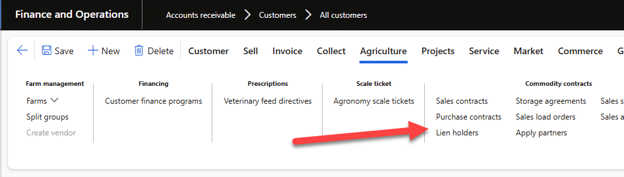
- On the Lien holders form, click New.
- Enter in the lien holder name that should display with the customer name on payments. For example, ‘First State Bank’.
- If applicable, select the commodity that has the lien. Most often the lien is not commodity specific so it can be left blank and set ‘All commodities’ = Yes.
- Select the State and County for the lien. Again, most often it is not county specific so that if often left blank. This state and county must match the customer’s primary address. It is not the state and county of the lien holder.
- Set an Expiration date for the lien if known. If there is not an expiration then leave at the default 12/31/2154.
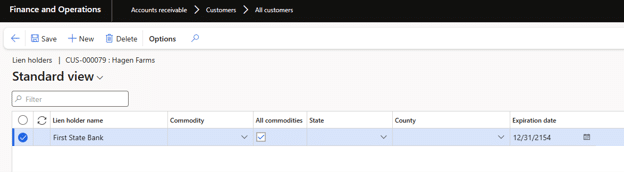
Once the lien holder is defined, there are 2 places that the information is used: purchase advances and inbound ticket settlements. The system will take the customer name and concatenate each lien holder name in the ‘Pay to the order of’ field.
Purchase Advance
- Commodity accounting > Inbound > Settlement > Purchase advance
- Create the purchase advance as normal selecting the customer, commodity and contract.
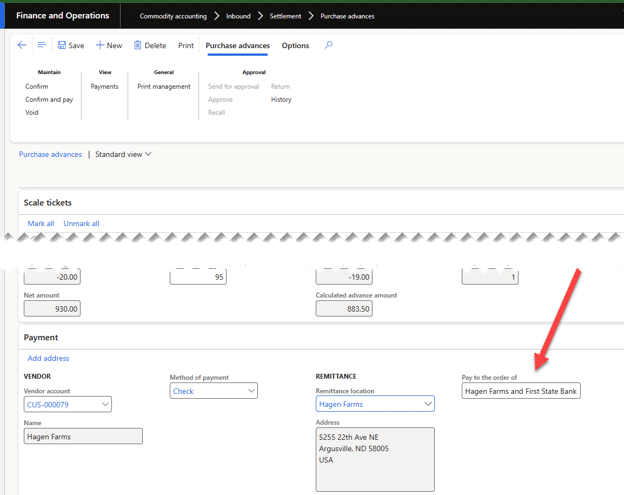
- On the Purchase advance detail form, in the Payment fast tab, the ‘Pay to the order of’ field will have the customer name and the lien holder name. You can modify as needed. Each lien holder will be listed. You have up to 100 characters in the field, so if there are multiple lien holders or long names you may need to abbreviate to fit within the allotted characters.
Settlements
- Commodity accounting > Inbound > Settlement > Settlement request
- Create the settlement request as normal, selecting the customer, commodity and tickets.
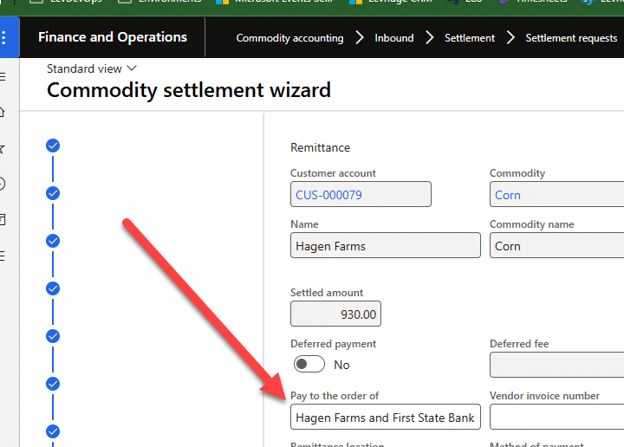
- On the final step of the settlement request wizard, the ‘Pay to the order of’ field will have the customer name and lien holders listed. You can modify as needed. Each lien holder will be listed. You have up to 100 characters in the field, so if there are multiple lien holders or long names you may need to abbreviate to fit within the allotted characters.
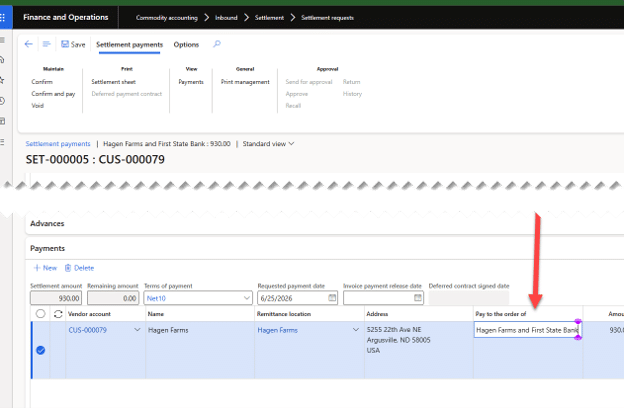
- After clicking Finish on the settlement request, on the Settlement payment form (Commodity accounting > Inbound > Settlement > Settlement payment), in the Payments fast tab grid the ‘Pay to the order of’ field will have the customer name and lien holders.
Why This Matters
By managing lien holders directly within your ERP, you reduce manual effort and ensure payments consistently include the correct parties. This leads to greater accuracy, fewer errors, and more confidence across your financial processes.
- Automatically included in payments
Lien holders populate the “Pay to the order of” field alongside the customer name in purchase advances and settlements. - Configured at the customer level
Once added, lien holders follow the customer across transactions—no need to re-enter details. - Use customer location—not lien holder location
State and county must match the customer’s primary address. - Usually not commodity-specific
Most liens apply broadly, so “All commodities” is commonly used. - Watch character limits
The payment field caps at 100 characters—abbreviate when needed. - Supports multiple processes
Lien holder data flows into both purchase advances and settlement payments