
Inbound Ticket Auto Apply Process
| Published: Feb 23, 2026 | Accounting , Grain , Scale , Tips | read
 read
readThe Levridge Commodity accounting inbound ticket auto apply process allows clients to reduce the manual effort of applying each inbound scale ticket to a purchase contract or storage agreement. By using configurable apply schedules, the system automatically manages ticket application based on pricing type, timeframes, and contract availability – freeing users to focus on higher‑value tasks.
Setup Inbound Ticket Auto Apply Schedules
You can configure multiple schedules to support different operational needs.
Navigation: Commodity accounting > Setup > Inbound ticket auto apply schedule
These schedules define delivery periods, pricing types, and timeframes the system should follow when matching inbound tickets to open contracts or agreements.
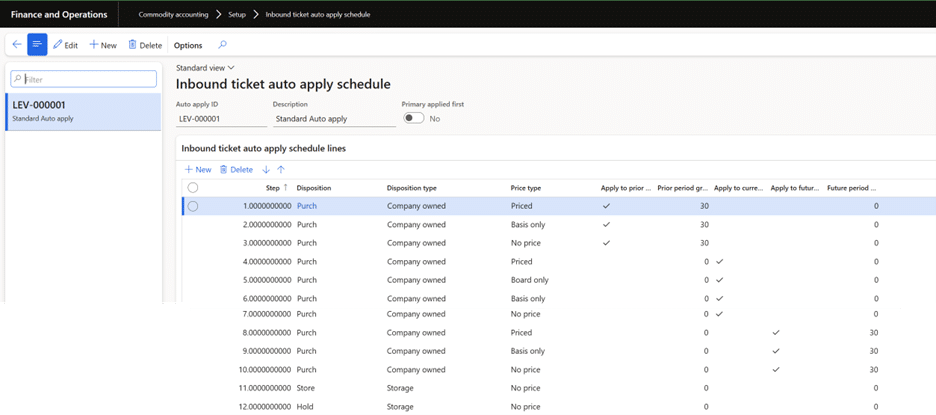
Best Practices for Defining the Schedule Lines
- Create a separate step for each pricing type and timeframe. For example there are 3 steps for applying priced contracts, first look for contract delivery periods that are up to 30 days in the past, then it moves to other pricing types that are 30 days old. Then looks for priced delivery periods that are current as step 4. Continues then down to step 8 where it would look for delivery periods up to 30 days in the future. Avoid 1 line of priced with values in prior, current, and/or future.
- You do not need to cover all pricing types. For example, the schedule below does not define applying to delivery periods that just have a board price. It will look for fully priced, then basis only, then no price (no board or basis). You could have a schedule that just looks for priced contracts if your policy is to always apply tickets to priced contracts and if there are none, users would review the tickets and determine where they should be applied.
- You do not need to cover all timeframes. You might want to run a schedule and apply only to contracts that are in a prior period and current. Never apply to a contract for a future dated delivery period.
Multiple Ways to Execute the Schedules
- From the Inbound ticket application form (Commodity accounting > Inbound > Delivery > Inbound ticket application). You can filter and select the tickets you want applied and then click ‘Auto apply’ in the action pane. You will see a dialog where you select the auto apply schedule you want to run. You would use this option if you want to control the tickets that the system would be automatically applying.
- From Inbound ticket auto apply under periodic tasks (Commodity accounting > Periodic > Inbound ticket auto apply). On the dialog you can select a commodity, customer, and/or branch to execute the schedule on. You do not have to select any filter but you do need to select the auto apply schedule. You would use this option if you want more flexibility around when the process is executed without having to manually select the tickets that should be auto applied.
- You can set the auto apply to run in a batch job so a user does not have to trigger it to run. Still done through periodic Inbound ticket auto apply, and in the dialog set ‘Batch processing’= Yes in the Run in background section. Then using the recurrence parameters set how often you want it to run.
How the Auto Apply Logic Works
The system processes your schedule in order, evaluating each step as follows:
- Identify contract delivery periods with remaining quantity that match the pricing type and timeframe defined in the step.
- If multiple contracts qualify:
- First sort by contract date (oldest first).
- If still multiple, sort by delivery period created date.
- The system applies the ticket quantity up to the remaining open contract quantity.
- If the ticket is larger than a single contract, the system finds the next qualifying contract.
- The system never automatically overfills a contract, even if overfill is allowed.
- Floating contracts are supported—when matched, the system increases the contract and delivery period quantity as appropriate.
Examples of Auto Apply in Action
Scenario 1:
Customer has a basis purchase contract for Jan 2026 delivery period, and the ticket date is Jan 14, 2026.
- When executed the system looks first for open delivery periods for prior periods up to 30 days prior to the ticket date. In this case the end date of the delivery period must be equal to or fall into 30 days prior to Jan 14, 2026 is a date range of Dec 15, 2025 to Jan 13, 2026. And are fully priced. This is step 1 of the schedule.
- It doesn’t find anything, then it goes to step 2 and looks for open delivery periods that have basis only and end date falls into that prior period.
- Nothing found, then step 3 for open delivery periods with no price, and end date falls into the prior period.
- Nothing found, then step 4 looking for open delivery periods that are fully priced where the ticket date falls into the delivery period start and end dates.
- On to step 5 which it finds the basis purchase contract that is for the current delivery period.
Scenario 2:
Customer has an open floating unpriced purchase contract for the delivery period of Dec 2025 and the ticket date is Jan 14, 2026.
- When executed the system looks first for open delivery periods for prior periods up to 30 days prior to the ticket date. In this case the end date of the delivery period must be equal to or fall into 30 days prior to Jan 14, 2026 is a date range of Dec 15, 2025 to Jan 13, 2026. And are fully priced.
- Doesn’t match so goes on to step 2 looking for open delivery periods for prior periods that have basis only.
- No match and on step 3 it finds that match since the delivery period end date is Dec 31, 2025 and the delivery period line has no price. Since it is a floating contract, the system increases the delivery period quantity and the contract quantity.
Scenario 3:
Customer has multiple contracts that meet the criteria for a single step. They have 2 contracts with open priced delivery periods with the dates Jan 1, 2026 to Jan 30, 2026. Ticket date is Jan 15, 2026. One contract has a contract date of Dec 15, 2025 and the second one is Jan 2, 2026.
- When executing, the system does not find matches for the first 3 steps since those are for prior periods.
- It gets to step 4 and it looks for open priced delivery periods where the ticket date (Jan 15, 2026) falls into the date range.
- It finds the 2 delivery periods from different contracts. Then it looks to the contract date for each of those delivery periods.
- It would apply the ticket to the contract with the contract date of Dec 15, 2025 since that is the oldest contract that meets the criteria.
Extending scenario 3:
If both of the contracts had the same contract date, so they were both Dec 15, 2025, then the system would look at the created date of the delivery period line.
- Which of these delivery periods was created first. Keep in mind the created date of the delivery period line is date effective.
- So if the original delivery period line was created Dec 15, 2025, but then you changed the quantity on that delivery period line on Dec 20, 2025 the system created a new record with that created date.
- Even if the original delivery period line might have been created first, it is based on the created date of the matched delivery period.
Additional Resources
View the Levridge YouTube channel.
For more information on Commodity Accounting, visit Commodity Accounting Solution.