
New Commodity Accounting Report: Print DPR by Branch
| Published: Feb 11, 2026 | Accounting , Grain , Product Updates , Release Notes | read
 read
readLevridge has introduced a new report: DPR by Branch, designed to make your reporting faster, easier, and more insightful.
Why This Matters
Clients rely on DPRs daily—sometimes multiple times a day—to monitor inventory positions. The old process required printing separate reports for each branch, which added unnecessary steps.
The new DPR by Branch report consolidates branch data into columns on a single report, along with a total column. This means:
- Less time spent running reports
- Better visibility across branches
- Streamlined batch processing for scheduled runs
What Sets This Report Apart
- Branch Columns + Total Column
Instead of printing multiple reports, you’ll now see all selected branches displayed as columns, plus a total column for quick aggregation. - Batch Processing Capability
Schedule the report to run automatically and deliver results via file or email—perfect for recurring needs. - Security Privilege
A new privilege, “Inquire into DPR by Branch report,” has been added under the duty LevCommodityReporting. Ensure you have access before proceeding.
How to Access the Report
Navigate to:
Commodity Accounting > Inquiries and Reports > Risk > DPR by Branch
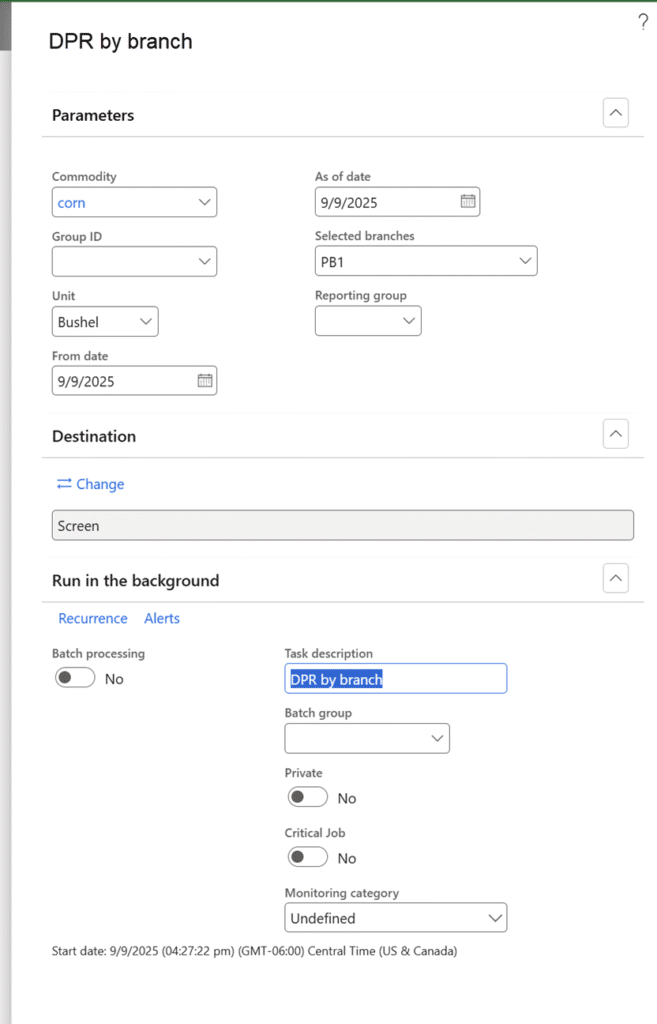
Running the Report
- Open DPR by Branch from the menu path above.
- Select Commodity or Commodity Group you want to report on.
- Choose Branches (up to 15) or a reporting group.
- Set Output Options:
- Print immediately
- Schedule as a recurring batch
- Send to file or email
- Click OK to generate the report.
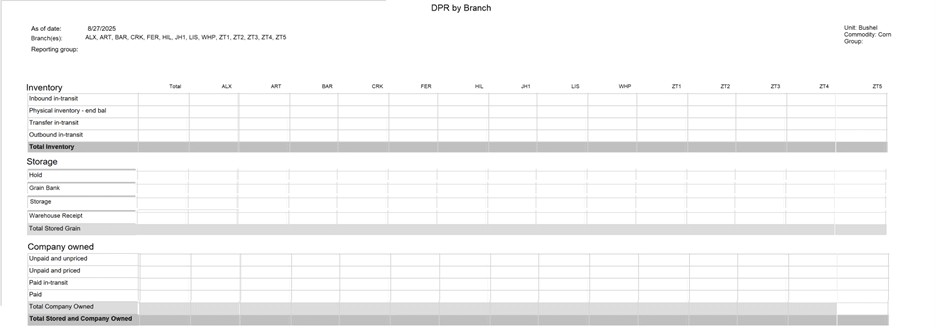
Rules to Remember
- Branch Limit: You can select up to 15 branches.
- Reporting Groups: If a reporting group contains more than 15 branches, you’ll get an error
- Calculations & Groupings: These remain the same as the existing DPR report. No changes to totals or formulas.
- Summary Only: This report prints summary values only—no activity details.
Key Benefits and Impact
The DPR by Branch report is all about efficiency. By consolidating branch data into one view, you’ll spend less time running reports and more time analyzing insights. Whether you’re managing inventory for a single branch or multiple locations, this feature simplifies your workflow and enhances visibility.
Traditionally, printing DPRs for multiple branches meant running the report several times—one for each branch and another for the total.
Additional Resources
View the accompanying YouTube video
For more information on Commodity Accounting, visit Commodity Accounting Solution.