
Reduce Data Entry and Improve Accuracy with Direct Ship Order Line Imports
| Published: Aug 28, 2026 | Accounting , Grain , Product Updates , Release Notes | read
 read
readThe new Levridge Commodity Accounting Direct Ship Order Line Import feature allows users to import shipment weights, grades, and related transportation details directly from Excel files into Levridge Commodity Accounting.
Users can export a standardized template, populate shipment information, and import the data into the system. The import process supports both origin and destination certificates and can process multiple direct ship orders within a single file.
The Challenge of Managing Direct Shipments
Weight and grade data often arrive at different times and through multiple channels, including emails, spreadsheets, PDFs, and third-party systems. Trading teams frequently receive origin information when a shipment leaves the supplier and destination information later when the shipment arrives at the customer. This creates manual work, delays, and opportunities for data entry errors.
Where to Find Direct Ship Order Line Imports
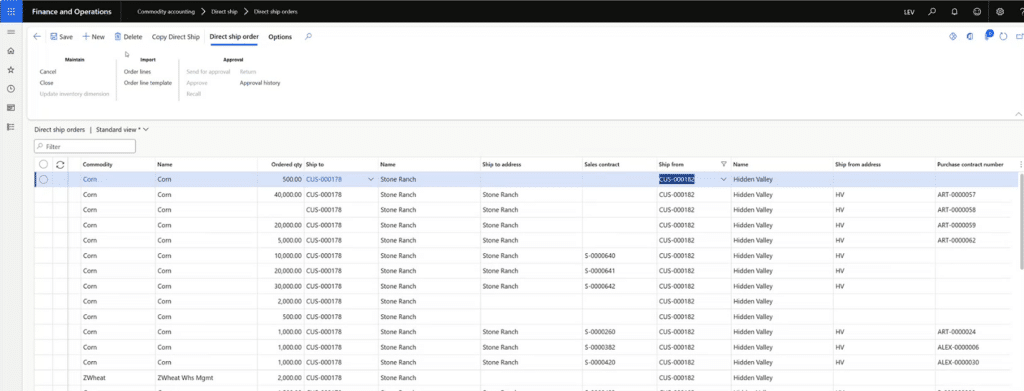
Direct Ship Order Line Imports are available from the Direct Ship Order workspace in Levridge Commodity Accounting. Users can access both the import template and import functionality directly from the new Import action group:
- Commodity Accounting > Direct Ship > Direct Ship Order
- Select the Import action group
- Choose Order Line Template to export an Excel template
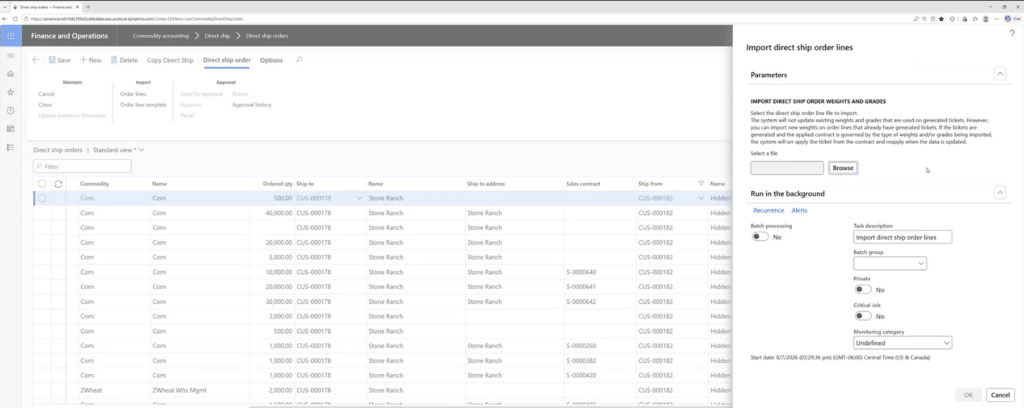
- Choose Order Lines to import weights, grades, and transportation details from an Excel file
The exported template includes the required fields needed to create or update direct ship order lines, including order information, ticket details, certificate type, weights, and grade factors. Users can then populate the spreadsheet and upload it back into the system through the Order Lines import process.
How Direct Ship Order Line Imports Work
When an imported order line does not already exist, the system automatically creates it. Existing order lines can also be updated with newly received weight or grade information, depending on ticket status and contract rules. The process validates data, enforces contract governance requirements, and updates related inbound and outbound tickets when permitted.
The feature also supports partial success processing. If one row contains an error, valid rows continue processing, and users receive clear feedback on any failures so they can correct and resubmit those records.
Why Automated Imports Matter
Direct shipment data frequently arrives in stages, and users must update records without disrupting contract integrity or freight calculations. The Direct Ship Order Line Import feature helps organizations keep shipment information current while maintaining the safeguards required for contract-governed transactions.
By automating the creation and update of direct ship order lines, organizations can reduce manual effort, improve data accuracy, and process larger volumes of transactions more efficiently.
The feature is particularly valuable for rail shipments, where a single direct ship order can contain numerous tickets that require ongoing updates throughout the shipment lifecycle.
Key Benefits for Commodity Trading Teams
- Import origin and destination weights and grades directly from Excel files.
- Automatically create missing direct ship order lines during import.
- Process multiple direct ship orders in a single import file.
- Keep inbound and outbound tickets synchronized through automated updates.
- Enforce contract-based rules to protect settlement accuracy.
- Update freight-related information when shipment details change.
- Receive row-level validation messages and resubmit corrected records without reprocessing the entire file.
- Reduce manual data entry and improve operational efficiency across direct ship workflows.
The result is a more efficient and scalable approach to managing direct shipments, allowing commodity trading teams to process shipment information faster while maintaining the controls required for contract execution, ticket management, and invoicing.
Additional Resources
- YouTube Video:
- Commodity Accounting